10 Chatbot Examples (With Free Templates)
10 chatbot examples you can try on the page, from lead generation to bookings, orders, hiring and feedback, each with a free template to copy.
You know a chatbot could help your website, but staring at a blank editor and wondering what to ask is where most people stop. That's why we put together these chatbot examples: ten real chatbots you can try right on this page, each one built from a free template you can copy and change for your business.
Five of them are lead generation chatbots for sales-led businesses. The rest cover bookings, food orders, hiring and feedback. For each one you'll see what it asks, why it's built that way, and what to change before you use it.
Every template is free to copy. Some use features from paid plans, like logic jumps and calendar booking, and we note those under each example.
- Lead generation chatbot examples
- Booking and order chatbot examples
- Hiring and feedback chatbot examples
- How to turn an example into your own
What Makes a Good Chatbot Example?
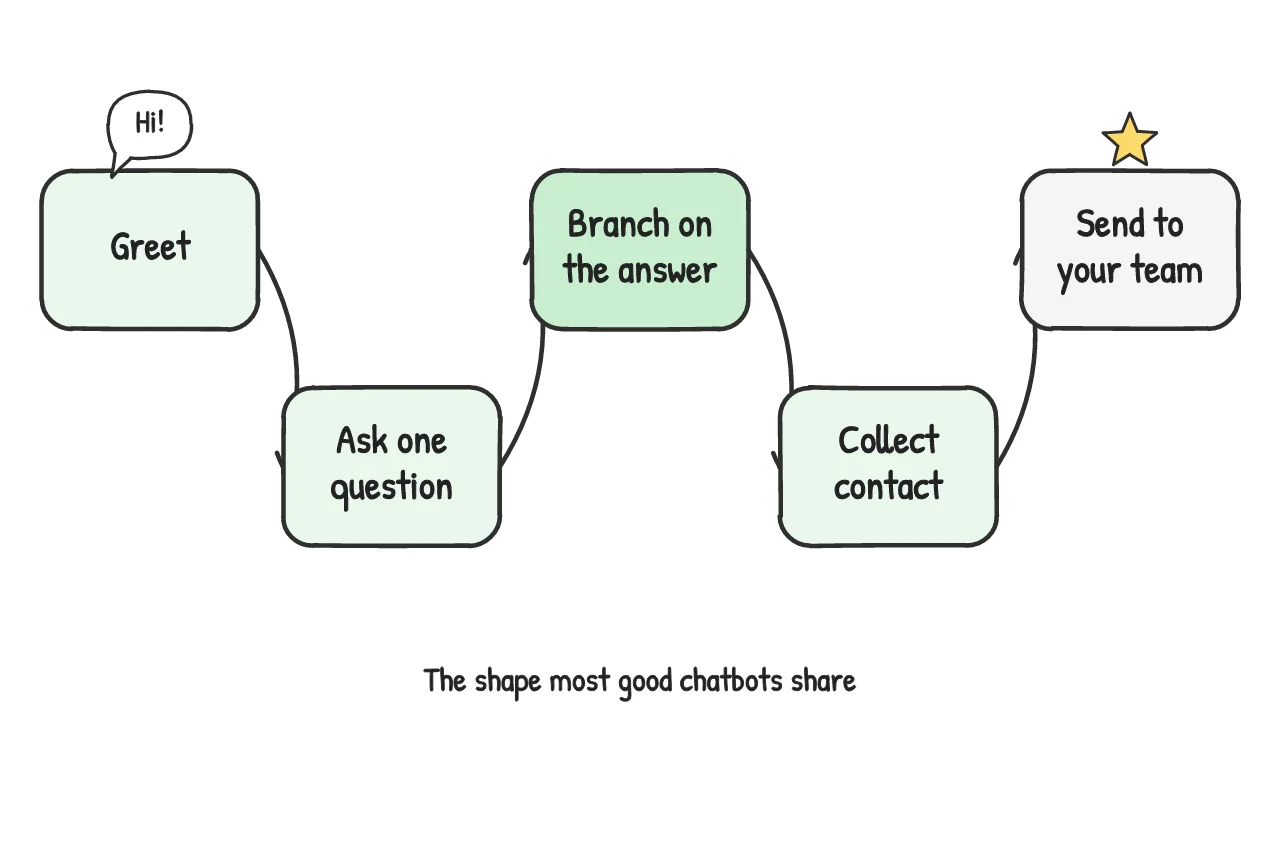
The chatbots below look different, but the good ones share a few habits. Keep these in mind while you try them, and you'll spot what to copy.
- One question at a time. Each message asks for one thing, usually with answer buttons, so visitors never face a wall of empty fields.
- The easy questions come first. The chatbot asks what the visitor needs before it asks for an email or phone number.
- Answers change the next question. A new customer and an existing one, for example, get different follow-ups. Collectchat calls this a logic jump.
- It ends with a next step. The visitor knows what happens now: a call, a quote, a booking or a reply by email.
If you're still deciding whether a chatbot is right for you at all, our comparison of a chatbot vs a form walks through when each one makes sense.
Lead Generation Chatbot Examples
These five chatbots help you find out who a visitor is and what they need, then pass a ready-to-act lead to your team. If lead generation is your main goal, our page on lead generation chatbots covers the setup in more depth.
1. Lead Capture Chatbot for Any Business
This one opens with an offer instead of a question: would the visitor like to learn how to rank their website in search results for free? If they say yes, it asks for their name, then whether they'd like a call. Say no to a call and it asks for an email instead, and if they skip that too, it explains why it needs a way to reach them.
Two ideas worth copying: lead with something the visitor actually wants, and let them choose how you get in touch. Swap the ranking offer for your own (a free quote, a checklist, a consultation), then add a question or two about budget and timeline so your team knows which leads to call first. Our guide to lead qualification questions has ready-made ones to borrow.
Plan: Uses logic jumps (paid plans).
Use it: open the Lead Generation template and edit the questions for your business.
2. Real Estate Chatbot for Buyers and Renters
This chatbot asks whether the visitor wants to buy or rent, then works through the details an agent needs: neighborhood (with suggestions as they type), bedrooms, maximum budget, property type and must-have amenities like laundry, a pool or pet-friendly. Only then does it ask for a phone number and name.
You end up with a short brief for every lead, so you can reply with matching listings instead of a generic "thanks, we'll be in touch". One upgrade to consider: add a logic jump after buy or rent, so buyers get asked about financing and renters about lease length.
Plan: Works on the free plan.
Use it: open the Real Estate Assistant template and edit the questions for your business.
3. Project Intake Chatbot for Agencies
Agencies lose a lot of time on discovery calls with prospects who were never a fit. This chatbot does the first round of discovery: it asks whether the visitor needs help, which service they're after (apps, websites, brand marketing or art), their budget on a slider, and whether the project is urgent. Then it asks for a first name and email.
Visitors who say they don't need help get a friendly goodbye with your contact links instead of a dead end. Change the service list to match yours and consider one open question about the project itself. That answer alone tells you a lot about how the first call should go.
Plan: Uses logic jumps (paid plans).
Use it: open the Digital Agency template and edit the questions for your business.
4. Insurance Chatbot for New and Existing Customers
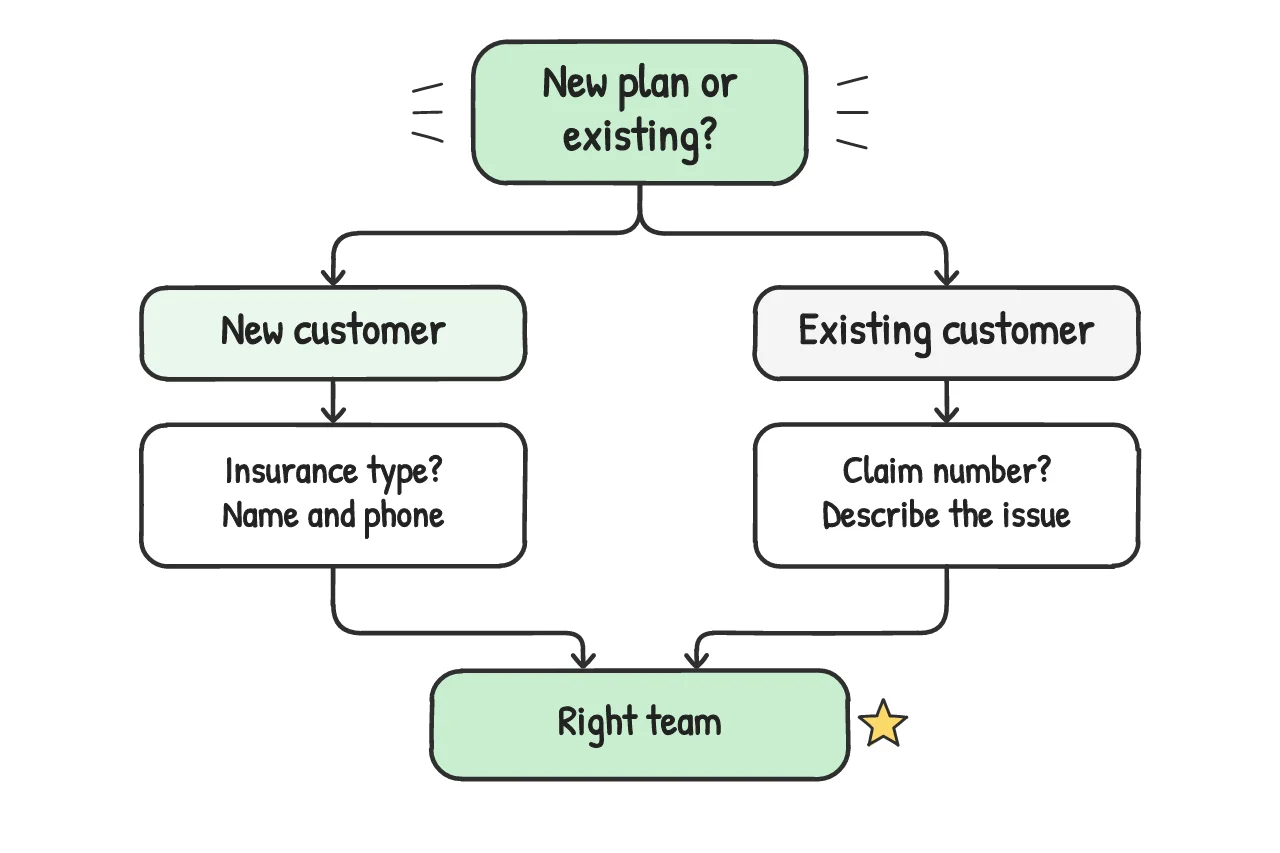
Two very different people land on an insurance site: someone shopping for a plan and someone who already has one. This chatbot asks which one the visitor is, then sends them down separate paths. New customers pick the type of insurance (car, home, health, travel and more) and leave a name and phone number for a call. Existing customers give their claim number and describe their issue.
The same idea works for banks, accountants and any service with several departments: ask what the visitor needs first, then route the answers to the right team. See our insurance chatbot page for more.
Plan: Uses logic jumps (paid plans).
Use it: open the Insurance Assistant template and edit the questions for your business.
5. Student Inquiry Chatbot for Study-Abroad Consultants
Study-abroad consultants answer the same first questions all day. This chatbot asks whether the student is applying for the first time, which country they want to study in, and which course they're after, then collects their name, email and mobile number so a counselor can follow up.
Schools and tutoring centers can use the same shape: swap the countries for campuses or subjects and the courses for grade levels. Small changes like these make the template feel written for your students.
Plan: Uses logic jumps (paid plans).
Use it: open the Education Consultancy template and edit the questions for your business.
Booking and Order Chatbot Examples
These chatbots take a request from start to finish: a booked slot, a food order or a trip inquiry with every detail you need.
6. Appointment Booking Chatbot
Booking by phone or email means a lot of back and forth. This chatbot is as short as a chatbot gets: it opens with your booking calendar, then asks for a first name (and greets the visitor by it) and an email address. That's the whole conversation.
Consultants can use it for discovery calls, clinics and salons for visits, and sales teams for demos. If you offer several services, add one question before the calendar so you know what each booking is for. Calendar booking is on paid plans, so check the pricing page before you plan around it.
Plan: Uses calendar booking (paid plans).
Use it: open the Appointment Booking template and edit the questions for your business.
7. Food Order Chatbot for Restaurants
Small restaurants, food trucks and caterers can take orders straight from their own site with this chatbot. Customers type what they want in their own words, add more items until they're done, then leave an email address so you can confirm the order. Anyone who hasn't decided yet gets your social links to browse first.
Before you use it, add a delivery or pickup question and ask for a phone number, so the kitchen can call if something's unclear. Then share it as a link on your social profiles and in DMs too, so people who find you on Instagram can order without hunting for your website.
Plan: Uses logic jumps (paid plans).
Use it: open the Eatery Order template and edit the questions for your business.
8. Travel Inquiry Chatbot
A travel agent needs the same details before quoting any trip. This chatbot collects them in one friendly conversation: whether they've picked a destination, how many days (on a slider), start date, group size, whether kids are coming, preferred hotel category, email, mobile number and any extra requirements.
Notice how it asks for a name partway through ("Sorry. I should have asked before."), which keeps the tone human. Tour operators and small hotels can use it as a direct inquiry chat too.
Plan: Uses logic jumps (paid plans).
Use it: open the Travel Booking template and edit the questions for your business.
Hiring and Feedback Chatbot Examples
The same conversational approach works when the person on the other side is a job applicant or a guest who just finished dinner.
9. Job Application Chatbot
Hiring for a role often means reading dozens of resumes from people who don't meet the basics. This chatbot screens for a sales role: it asks for a name, email and LinkedIn profile, years of experience, a self-rating of sales knowledge, how they'd describe themselves, two quick test questions and their expected salary.
Swap the role details and test questions for your own, and add any must-haves, such as a certification or weekend availability. Asking for a LinkedIn link works on every plan; if you'd rather collect resumes as files, file uploads are on paid plans.
Plan: Works on the free plan.
Use it: open the Job Application template and edit the questions for your business.
10. Restaurant Feedback Chatbot
Not every chatbot is about leads. This one thanks diners and asks what they'd like to do: tell you what they think, recommend you on social media, see your current offers, or ask you to call or email them back.
If you want scores you can track, add a quick rating question for food and service at the start. Then print its link as a QR code on table cards or receipts. Guests answer while they're still at the table, which gives you a chance to fix a problem before it turns into a public review.
Plan: Uses logic jumps (paid plans).
Use it: open the Restaurant Feedback template and edit the questions for your business.
How a Chatbot Helps: Turn an Example Into Your Own
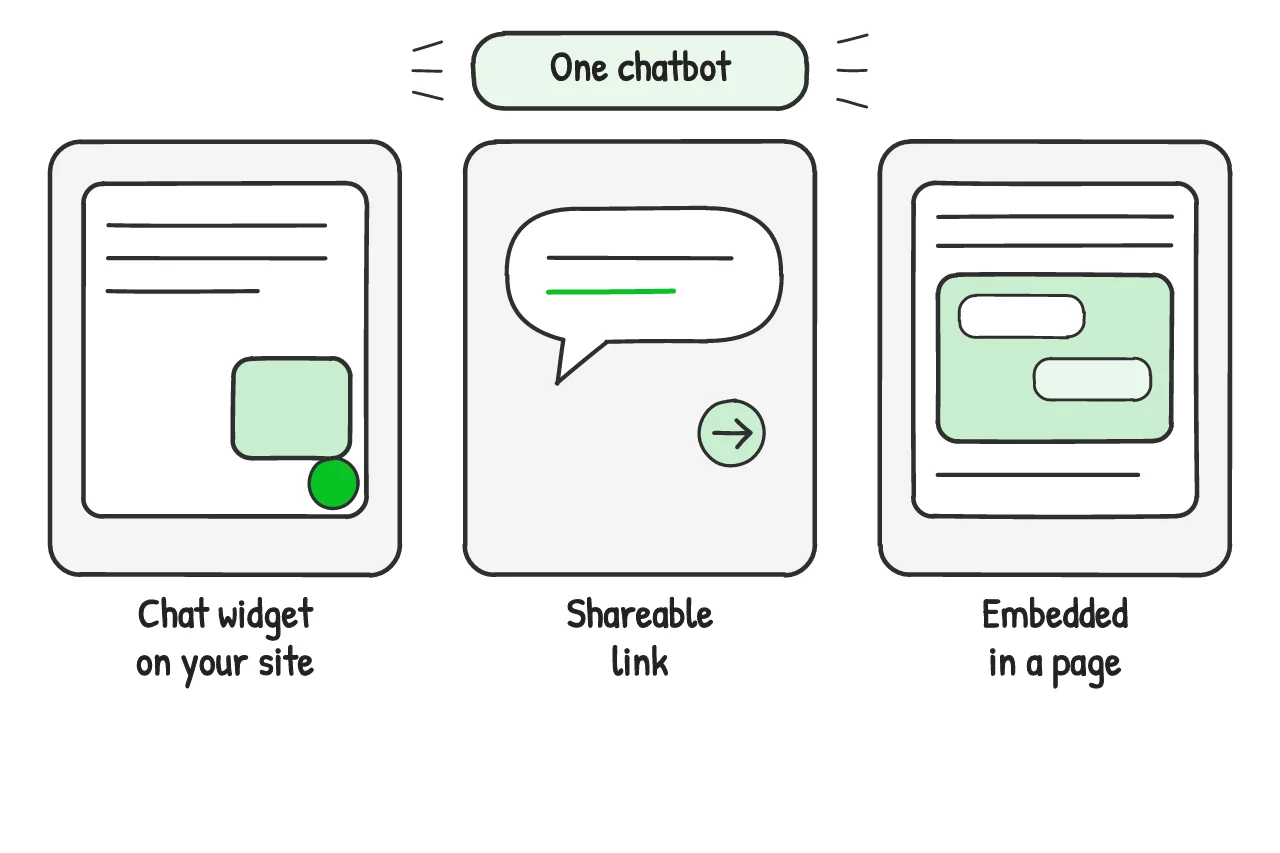
Every example above is a Collectchat template. Here's how to go from "that looks useful" to a chatbot that's live for your own visitors.
- Pick the closest example. Choose by what you want the visitor to do (leave details, book, order, apply, give feedback), not by industry. A dentist can start from the appointment booking chatbot just as easily as a consultant.
- Rewrite the questions in your own words. Swap the answer buttons for your real services, price ranges or locations. Cut any question you wouldn't act on.
- Add a logic jump where answers differ. If two kinds of visitors need different follow-ups, send them down separate paths. Logic jumps are on paid plans.
- Decide where the answers go. Every plan can email you new responses. Paid plans add Google Sheets, Zapier, webhooks and email routing to a specific person.
- Choose where it lives. Use it as a chat widget on your website, share it as a link in DMs, chats or email (no website needed), or embed it inside any page, as on this one.
If it's your first chatbot, the quick start guide in our Help Center walks through the editor step by step.
Summing Up
The best chatbot examples have one thing in common: they ask the questions your team would ask anyway, in the order a real conversation would go. Start with the example closest to what you need, change the questions to fit your business, and put it wherever your visitors already are.
Want more ideas? Browse all our chatbot templates, or start with the lead generation template.